
The sales tech stack small B2B teams actually need

Most small B2B teams need fewer sales tools than software comparison articles suggest.
A CRM, prospecting platform, automation tool and several AI subscriptions can look like a complete sales system. Then somebody asks which opportunities are likely to close this month and everyone develops a sudden interest in the carpet.
A useful sales tech stack should help your team answer five questions:
- Who should we be selling to?
- Which prospects and opportunities are active?
- What needs to happen next?
- Where are deals stalling or being lost?
- What revenue is likely to close, based on evidence?
Technology should make those answers easier to find and trust.
Affiliate disclosure: Some links in this article may be affiliate links. If you purchase through one, we may receive a commission at no additional cost to you. We only include tools we believe are relevant to the sales problems discussed.
What is a sales tech stack?
A sales tech stack is the collection of software a company uses to find prospects, manage relationships, progress opportunities, send proposals, monitor performance and forecast revenue.
For a small B2B team, the essential sales technology stack usually includes:
- A CRM
- Email, calendar and online meeting software
- Prospecting and contact research tools
- Proposal or electronic signature software
- Sales reporting
- Selected automation and AI tools
Lead diagnostics, call recording and LinkedIn automation can be added when there’s a clear reason for using them.
Every additional platform introduces another subscription, another source of information and another place for data to disappear. The aim is to create a connected system the team will use consistently.
What should a small B2B sales tech stack include?
| Requirement | Suggested starting point |
|---|---|
| CRM and pipeline | Pipedrive or HubSpot |
| Email and meetings | Microsoft 365 or Google Workspace |
| Prospecting data | Apollo.io |
| LinkedIn outreach | Manual outreach or Dripify with careful risk assessment |
| Lead qualification | ScoreApp |
| Proposals and signatures | Existing templates, e-signature or proposal software |
| Reporting | Native CRM dashboards |
| Automation | Native CRM workflows, Zapier or Make |
| AI assistance | An approved tool with clear data rules |
Four or five properly connected tools can cover most small-team requirements. There’s little glory in owning 17 subscriptions if the forecast still relies on optimism and memory.
1. Choose the CRM first
The CRM is the centre of the sales tech stack.
It should provide a shared record of:
- Companies and contacts
- Qualified opportunities
- Deal values
- Pipeline stages
- Expected close dates
- Next actions
- Emails, calls and meetings
- Reasons for winning or losing
- Forecast information
The right CRM depends on how the company sells and which other functions need access to the system.
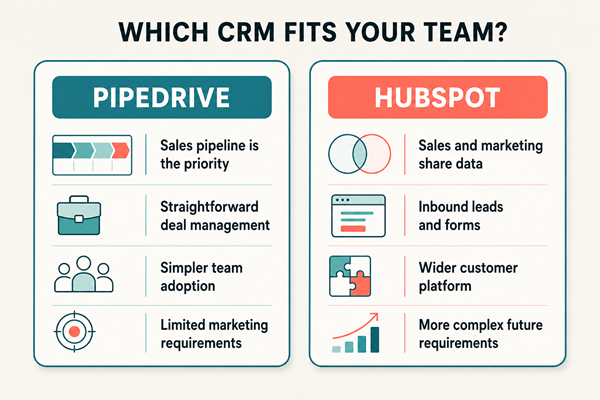
Pipedrive: for straightforward sales pipeline management
Pipedrive is designed around visual pipeline and opportunity management. It allows teams to track deals, stages, activities and follow-up from one central view. Pipedrive’s official product information explains how its pipeline view tracks deals, stages and related activities.
It’s worth considering when:
- Sales pipeline visibility is the main priority
- The team has a relatively clear sales process
- Adoption needs to be simple
- Salespeople need to see their next actions
- Extensive marketing automation isn’t required
HubSpot: for connected sales and marketing
HubSpot combines CRM functionality with sales, marketing and customer service tools. Its CRM includes contact, deal and task management, email tracking, meeting scheduling and other sales features.
It may be more suitable when:
- Marketing and sales need to share lead data
- The company uses forms and inbound campaigns
- Customer service information should sit alongside sales
- The business expects to add more sophisticated automation
- Someone has time to manage the platform properly
HubSpot can begin relatively simply, but packages and costs can grow alongside the company’s requirements. Compare what you’ll probably need in 12 months, rather than choosing solely on the free tools available today.
Pipedrive or HubSpot?
Choose Pipedrive when straightforward sales pipeline management is the priority.
Choose HubSpot when the company wants a broader platform connecting marketing, sales and customer management.
Whichever CRM you choose, configure it around the buyer’s progress. Pipeline stages should represent meaningful changes in the opportunity, such as discovery completed, requirements confirmed or commercial decision underway.
“Proposal sent” only confirms that somebody pressed send. It says rather less about whether the buyer intends to proceed.
2. Use Apollo.io for prospecting data and outreach
Apollo.io combines B2B contact data, company research and sales engagement features. Its sales engagement platform includes email sequences, calls, tasks, analytics and LinkedIn-related workflow support. Apollo’s official product overview explains these capabilities.
Apollo may be useful when a business:
- Has a clearly defined ideal customer profile
- Needs to identify relevant companies and contacts
- Wants to build targeted prospect lists
- Runs structured email outreach
- Needs prospecting activity connected to its CRM
- Can monitor data quality, responses and exclusions
Start with the target market and buying problem. A large contact database can increase the amount of outreach you send, including outreach to people who were never credible prospects.
Before using Apollo, define:
- The companies you want to reach
- The roles involved in the buying decision
- The commercial problem that makes the approach relevant
- Trigger events that indicate possible demand
- Companies and people who should be excluded
- How replies, objections and opt-outs will be handled
UK businesses must consider UK GDPR and PECR when using personal data and sending direct marketing. The rules depend on the recipient, communication method and type of organisation being contacted. The ICO’s B2B marketing guidance should be reviewed before launching a campaign.
3. Where Dripify fits
Dripify is a LinkedIn and email outreach platform. It allows users to create sequences containing activities such as connection requests, profile visits, messages and follow-ups. It also provides campaign analytics, lead management and team features.
It may appeal to teams that:
- Use LinkedIn as a regular prospecting channel
- Want to organise multi-step outreach
- Need structured follow-up
- Want to test different messages
- Need visibility across team activity
There is an important risk to understand.
LinkedIn says it doesn’t permit third-party software or browser extensions that scrape information or automate activity on its website. Use of prohibited software can result in account restrictions. LinkedIn sets this out in its prohibited software policy.
Dripify describes features designed to control activity and support safer usage. That doesn’t amount to approval from LinkedIn or remove the possibility of restriction.
Any business considering Dripify should weigh:
- The value of the LinkedIn account
- LinkedIn’s current terms
- The volume and type of activity being automated
- The relevance and quality of the targeting
- The reputational effect of automated messages
- Whether the process could be handled manually
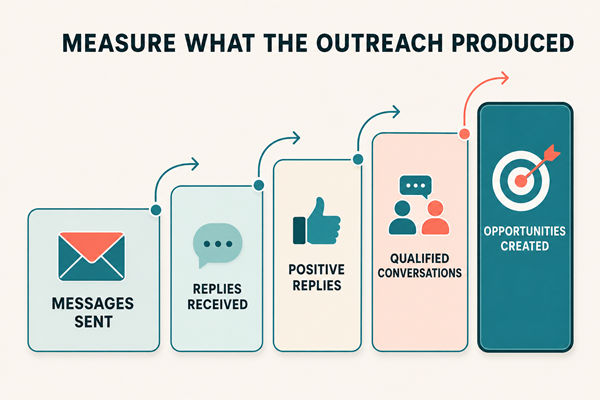
Automation also creates a behavioural problem. Once a team can send more messages, message volume becomes highly visible and easy to measure. Relevance, buyer response and opportunity quality are harder to measure, yet considerably more important.
Track positive replies, qualified conversations and opportunities created. Connection requests sent tells you what the software did. It doesn’t tell you whether the outreach worked.
4. Use ScoreApp for diagnostic-led lead generation
ScoreApp allows businesses to create scorecards, assessments and quizzes that give users a personalised result.
It can help a B2B company:
- Turn expertise into a useful assessment
- Identify the problems a prospect is experiencing
- Segment leads according to their answers
- Provide more relevant follow-up
- Gather structured information before a sales conversation
- Learn which problems appear most often in the market
We use ScoreApp for the PBC Sales Diagnosis, which assesses positioning, pipeline, conversion, leadership and visibility.
A diagnostic works best when the questions help somebody understand a real problem. It also needs a defined audience, traffic source and follow-up process.
Otherwise, you’ve built a rather attractive empty room.
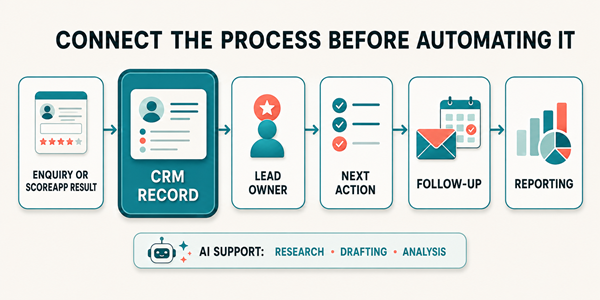
Connect ScoreApp to the CRM so results, contact details and subsequent conversations remain part of the same customer record.
5. Connect email, meetings and proposals
Most small teams already use Microsoft 365 or Google Workspace for email and calendars. Connect that existing account to the CRM before adding more communication software.
The connection should help the team:
- Record relevant emails against contacts and opportunities
- See meeting history
- Create follow-up activities
- Access relationship context
- Keep the next action visible
Dedicated proposal software becomes useful when proposals are frequent, inconsistent or slow to approve. It can also help with templates, signatures, reminders and version control.
Proposal-open notifications deserve a little scepticism. They’re immediate, specific and satisfyingly dramatic. An opened document doesn’t confirm buying intent.
Agreed next steps, stakeholder involvement and commercial decisions remain stronger evidence.
6. Keep reporting inside the CRM initially
Most small B2B teams can begin with their CRM’s native dashboards.
Prioritise measures that support decisions:
- Qualified pipeline value
- Pipeline coverage
- Stage conversion
- Win rate
- Average deal value
- Sales cycle length
- Opportunity ageing
- Close-date slippage
- New pipeline created
- Lost reasons
- Closed revenue
The measures displayed most prominently will influence behaviour.
If the dashboard celebrates calls and emails, people will concentrate on generating calls and emails. This can produce a busy team with a surprisingly relaxed relationship with revenue.
We explain that problem further in When sales activity becomes the target.
7. Add automation and AI carefully
Automation tools such as Zapier, Make and native CRM workflows can connect forms, diagnostics, calendars and sales records.
Useful examples include:
- Creating a CRM record after an enquiry
- Adding ScoreApp results to the correct contact
- Assigning leads according to defined criteria
- Creating follow-up tasks after meetings
- Flagging opportunities with no next action
- Updating a deal after a proposal is signed
Automate processes that already work consistently. Write down the trigger, information being moved, destination, owner and failure process first.
AI tools can then support account research, meeting preparation, follow-up drafts, transcript summaries, proposal drafts and analysis of lost-deal information.
The CRM should remain the shared customer and opportunity record. Set rules covering approved AI tools, client data, recording, fact-checking and human responsibility.
Confidently written nonsense remains nonsense. It has simply arrived wearing a nicer shirt.
How to choose a sales tool
Ask these questions before adding anything:
- Which specific sales problem does it solve?
- How do we handle that problem now?
- Who will use the tool?
- Does it connect with our CRM?
- Which existing tool could it replace?
- What data will it collect?
- How will we measure whether it helped?
- What happens if we remove it after six months?
Run a small test around one workflow, team or sales stage. Decide what improvement you expect before starting.
This reduces status quo bias later. Once a platform contains data, templates and team habits, cancelling it feels harder, even when nobody can prove it improved sales.

Frequently asked questions
What is the most important part of a sales tech stack?
The CRM is usually the most important component because it holds the shared record of contacts, opportunities, next actions, pipeline and forecast information.
What is the best CRM for a small B2B team?
Pipedrive is a strong option for straightforward sales pipeline management. HubSpot suits businesses that want sales, marketing and customer activity within a broader platform.
Is Apollo.io a CRM?
Apollo.io primarily provides sales intelligence, prospecting and engagement capabilities. It can support CRM-related workflows, but many businesses connect it to a dedicated CRM such as Pipedrive or HubSpot.
Is Dripify safe to use with LinkedIn?
Dripify provides controls intended to manage automated activity. LinkedIn’s policies prohibit third-party software that automates activity on its website, so an account restriction risk remains.
How many sales tools does a small team need?
Many small B2B teams can cover their essential requirements with four or five connected tools. Add software when a defined process, data or visibility problem justifies it.
Build the system before expanding the stack
Sales technology should help people follow the process, manage opportunities and make better commercial decisions.
When CRM information is unreliable or the pipeline stages are unclear, the underlying sales system needs attention.
Our Strategic Sales Audit examines pipeline, process, CRM, reporting and deal progression to identify where performance is being lost.
Where the system needs rebuilding, Sales System Implementation turns that diagnosis into a practical sales process, CRM structure and reporting rhythm.